
Boost web performance with Service Workers
If you've been working on the performance of your websites for a while and haven't tried service workers yet, keep reading. A Service Worker is a script that runs in your browser which helps to optimize asset loading on your website, even allowing the caching of assets in the browser for offline usage. This is not an in-depth tutorial about the ins and outs of service worker, but rather an insight in the benefit the service worker brings to your website's Lighthouse performance score.
For this post, I'm using Lighthouse, because this checks the performance at this moment in time, rather than the performance over a longer period of time. The following screenshots have been taken on the same day. The first set of screenshots represent the website without a registered service worker and the second set of screenshots were taken when I registered the service worker. It's the same website, the only difference is the service worker.
Before the Service Worker
An insight wouldn't mean anything if we don't have a before and after situation. In the following two screenshots you see the before screenshots for the mobile and desktop scores.
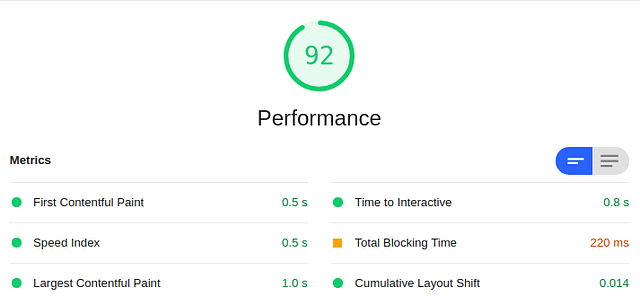 Lighthouse performance score (desktop) before Service Worker
As you can see, the score for desktop was quite good already and didn't need a lot of improvement. However, if we look at the score for mobile there is different situation.
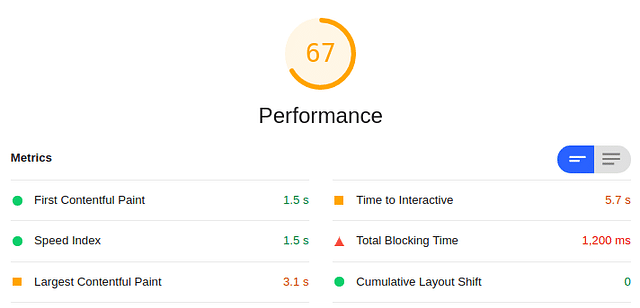 Lighthouse performance score (mobile) before Service Worker
The score for the mobile version wasn't great and really needed some improvement, especially since most traffic (80%+) to this website is on mobile devices.
In comes the service worker
As the website I've run this test on is built with Laravel, I use Laravel Mix for compiling Sass and other assets. Laravel Mix has a plugin to generate a service worker: laravel-mix-workbox. With this extension, you can very easily generate a service worker for the compiled assets.
This is an excerpt of the configuration I use to generate the service worker:
The most important thing to not here is that you need to include the "webpackConfig" section. If you don't do this, the Service Worker will attempt to cache your assets with an extra leading slash: "//css/style.css". This will throw errors and will cause the Service Worker to not launch because it won't launch if there are any errors. So by adding "webpackConfig" with the new publicPath, you solve this issue.
You can use this same configuration if you're using Webpack to bundle and compile your assets. Simply replace "generateSW" with "new GenerateSW" and include it in the plugins section of your webpack.config.js file.
Now that you have the sw.js file, you need to include it in your webpage:
After the service worker
Now that we have the service worker installed on your webpage, we can check our Lighthouse performance score once again. These are the screenshots for the Lighthouse performance scores on mobile and desktop after including the service worker.
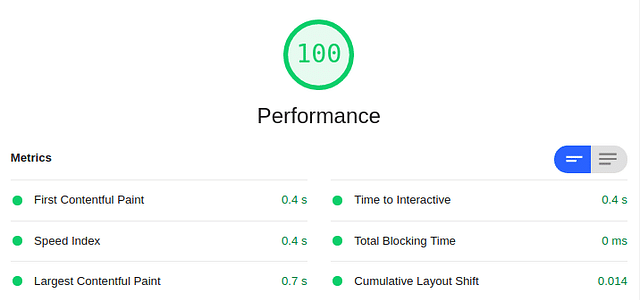 Lighthouse performance score (desktop) after Service Worker
As you can see, the score is higher than it was. It's a nice boost to our score, but the desktop version never needed the extra performance to begin with. Mobile on the other hand has made a massive jump:
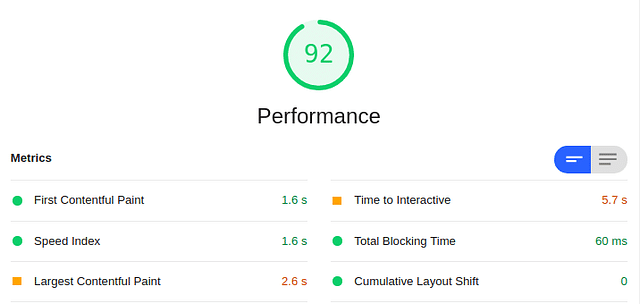 Lighthouse score (mobile) after Service Worker
The mobile score is now high enough to be green, which was my goal when I started this. The Service worker has caused the score to jump quite a bit and load the static assets much more efficiently.
Other actions taken to improve the score
To achieve this score, having a poorly optimized website and only adding a service worker isn't enough. Before adding the service worker, I'd already carried out a variety of different optimizations:
- Lazy loading images through loading="lazy"
- Properly sizing images with Gumlet
These factors all played a role in the final score, but it doesn't take away that the service worker still provides a nice performance boost.
Conclusion
Adding a service worker to your website can massively improve the Lighthouse performance score, your UX, and even results in a better SEO score. So if you're able to do this for your projects and you're looking to get some extra performance out of your website, including a service worker is one of the quickest performance boosts you can get.
Posted on: August 5th, 2020I streamline your business with software that actually fits the way you work.
Ready to streamline your business? Let’s chat.